

The Warhammer 40K: Rogue Trader faction reputation system can be quite a doozy at first glance. That’s because it’s unlike most other mechanics seen in traditional role-playing games. Thankfully, we’ve got a few tips to help you make sense of the whole thing. Our guide discusses how trading and faction reputation works in Warhammer 40K: Rogue Trader.
How do mechanics like item trading and faction reputation work in Warhammer 40K: Rogue Trader?
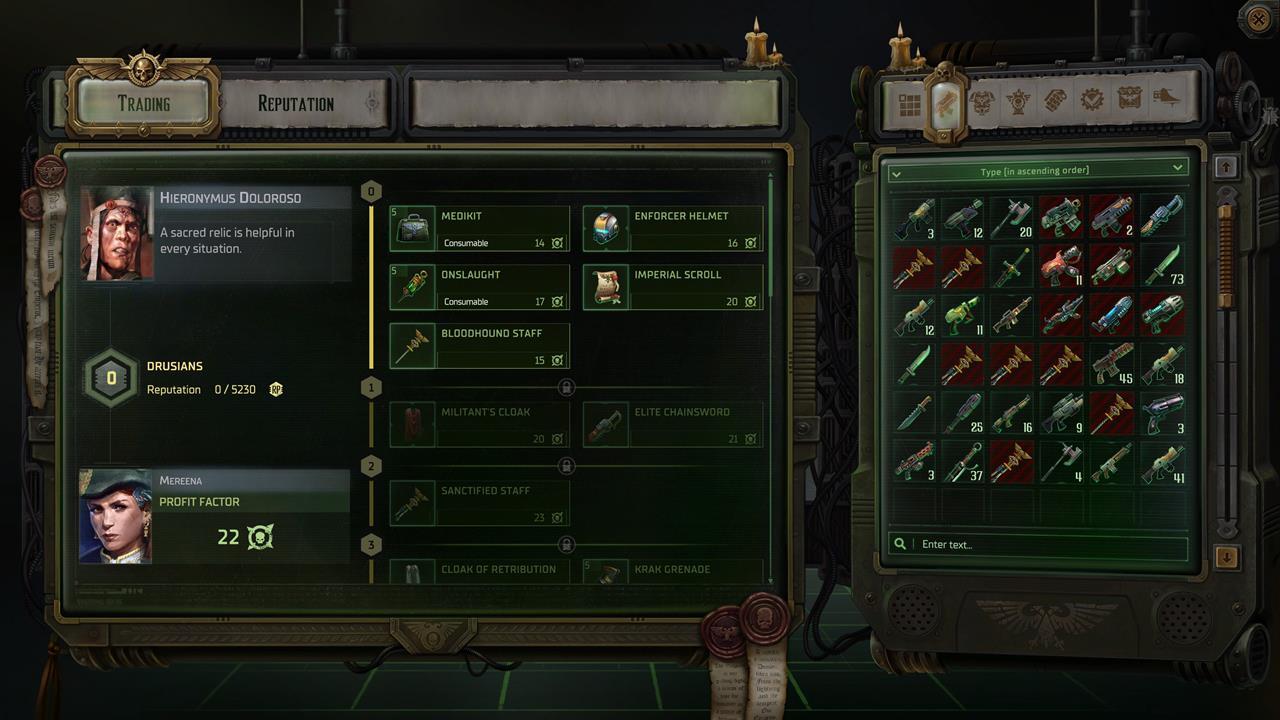
The item trading in Warhammer 40K: Rogue Trader is primarily based on the reputation that you’ve earned for each faction. Other facets are also considered, such as your Profit Factor. Here’s a quick summary:
Each Warhammer 40K: Rogue Trader faction has its own item pool and vendor. The higher your Reputation Points (RP) and rank with that faction, the more items you can buy.Instead of spending gold/credits/cash on each item, you only need to look at Profit Factor, which is more akin to a set level than a deductible currency.For each reputation tier that you reach, and assuming you have the necessary amount of Profit Factor, you can buy all the items for free.Here’s a quick example: Let’s say you’re at Rank 0 for a particular faction and that vendor is selling five items at Rank 0.You have 20 Profit Factor. The vendor has four items with a requirement of 20 Profit Factor or lower. The fifth requires 25 Profit Factor.You can buy those four items, but not the fifth. Your Profit Factor won’t be affected. Again, it’s not like a basic currency seen in most other games.Disregard what you know about the usual buy-and-sell methods in video games.
Where to find faction reputation vendors in Warhammer 40K: Rogue Trader
When it comes to Warhammer 40K: Rogue Trader faction reputation, you’re looking at five distinct organizations. You can find their vendors as early as Act 1 in the Furibundus system and the planet of Footfall:
Continue Reading at GameSpot The Warhammer 40K: Rogue Trader faction reputation system can be quite a doozy at first glance. That’s because it’s unlike most other mechanics seen in traditional role-playing games. Thankfully, we’ve got a few tips to help you make sense of the whole thing. Our guide discusses how trading and faction reputation works in Warhammer 40K: Rogue Trader.Table of Contents [hide]How do mechanics like item trading and faction reputation work in Warhammer 40K: Rogue Trader?Where to find faction reputation vendors in Warhammer 40K: Rogue TraderHow do mechanics like item trading and faction reputation work in Warhammer 40K: Rogue Trader?The item trading in Warhammer 40K: Rogue Trader is primarily based on the reputation that you’ve earned for each faction. Other facets are also considered, such as your Profit Factor. Here’s a quick summary:Each Warhammer 40K: Rogue Trader faction has its own item pool and vendor. The higher your Reputation Points (RP) and rank with that faction, the more items you can buy.Instead of spending gold/credits/cash on each item, you only need to look at Profit Factor, which is more akin to a set level than a deductible currency.For each reputation tier that you reach, and assuming you have the necessary amount of Profit Factor, you can buy all the items for free.Here’s a quick example: Let’s say you’re at Rank 0 for a particular faction and that vendor is selling five items at Rank 0.You have 20 Profit Factor. The vendor has four items with a requirement of 20 Profit Factor or lower. The fifth requires 25 Profit Factor.You can buy those four items, but not the fifth. Your Profit Factor won’t be affected. Again, it’s not like a basic currency seen in most other games.Disregard what you know about the usual buy-and-sell methods in video games.Where to find faction reputation vendors in Warhammer 40K: Rogue TraderWhen it comes to Warhammer 40K: Rogue Trader faction reputation, you’re looking at five distinct organizations. You can find their vendors as early as Act 1 in the Furibundus system and the planet of Footfall:Continue Reading at GameSpot GameSpot – All Content
Discover more from GMDegens.io
Subscribe to get the latest posts sent to your email.